Notis

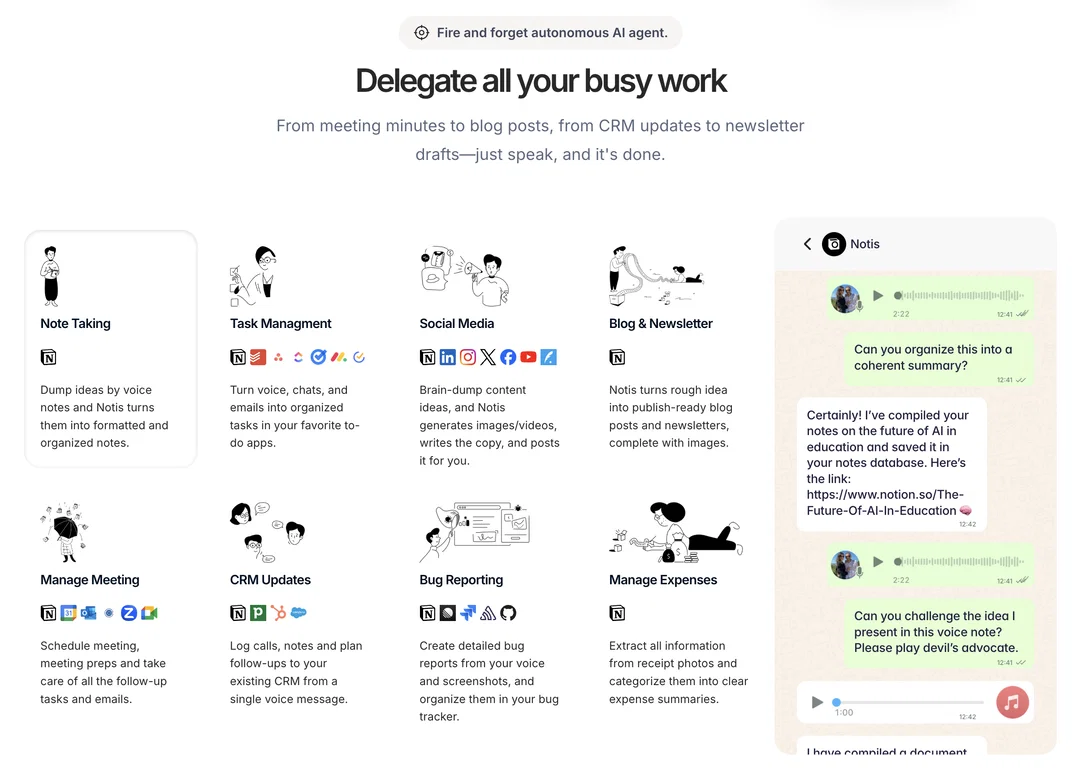
Notis is the AI intern that lives in your messaging apps and works like a small, tireless team. It turns your voice into clean notes, structured tasks, meeting summaries, and polished drafts, all synced into Notion with the finesse of someone who actually understands your workspace. It’s built for founders and fast-moving professionals who want leverage without overhead: speak, forward, delegate — Notis handles the rest. Powered by your existing tools, fluent in iMessage, WhatsApp, Telegram, and email, it dissolves friction and gives you time back, turning busywork into background noise.

Pros and Cons

Pros

Connect with one click to +800 apps
Works on Whatspp, iMessage, Telegram, Slack and emails
Setup in minutes not days
No need to buy a Mac Mini to run it ;)

Cons

Requires initial onboarding
Won’t give you an excuse to buy that Mac Mini you wanted
No free version
No offline capability

How does Notis AI work with WhatsApp?

Notis AI works with WhatsApp by operating directly within the application. You can capture and organize your thoughts using voice commands, and the tool will intelligently process these inputs to provide insightful answers from your Notion workspace. It also sends task reminders directly on WhatsApp, making it a very mobile- and user-friendly tool.

Can Notis AI really transcribe my voice notes?

Yes, Notis AI is capable of transcribing your voice notes. It turns your free-flowing thoughts and brainstorms into well-structured notes. This feature aids in the documentation and organization of your ideas, potentially boosting productivity.

Does Notis AI help with task management?

Notis AI assists with task management in many ways. It can record your tasks throughout the day as they come, and create individual entries with priorities for each task. It can also remind you about these tasks directly on WhatsApp, helping to keep you organized and ensure that nothing falls through the cracks.